Starting with the upcoming SQL Server 2017 CU3 and SQL Server 2016 SP2 releases, CXPACKET waits are split into an actionable wait (CXPACKET) and a negligible wait (CXCONSUMER).
(these wait types are already present in Azure SQL Database).
 admin
admin
SQL Server Trace Flags
Microsoft have published a useful list of all SQL Server trace flags in a single location:
DBCC TRACEON – Trace Flags
In the past, some of these were poorly documented or hard to find.
Shared Memory Protocol is not Supported on SQL Server Failover Clusters
I was recently trying to work out why SSAS installed on the same server as SQL Server would not use shared memory for its processing connections. It may be obvious to some people, but an internet search turns up surprising few references: the Shared Memory Protocol is not Supported on SQL Server Failover Clusters.
On a standard SQL Server instance, the Shared Memory protocol can be used when a client is running on the same computer as the SQL Server instance and the Shared Memory Protocol is enabled in SQL Server’s network protocols. (You can check the status of the enabled protocols using SQL Server Configuration Manager).
sys.dm_exec_connections will show you which net transport a client connection is using:
SELECT net_transport FROM sys.dm_exec_connections WHERE session_id = @@SPID;
You can force a client connection to use a specific protocol by prefixing the Server name in the connection string with one of these modifiers:
- TCP: tcp:
- Multiprotocol = rpc:
- Shared Memory = lpc:
e.g. Force connection to use the TCP protocol:
Server=tcp:MyServerName;Database=MyDB;Trusted_Connection=True;
In addition, you can force the client connection to use the Shared Memory protocol by using (local) as the server name. You can also use localhost or a period (.) e.g.:
Server=(local);Database=AdventureWorks;Trusted_Connection=True;
SSMS 17.3 has XE Profiler built-in
New to SQL Server Manager Studio (SSMS) 17.3 is the XE Profiler. This is Profiler-like functionality built-in to SSMS:
SSMS 17.3 has Profiler built-in
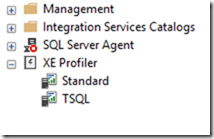
Just double-click either of the two entries to create a live trace window (built on the SSMS XE “Watch Live Data” functionality). The event sessions that will be created are named:
- Standard: QuickSessionStandard
- TSQL: QuickSessionTSQL
SSAS: Turn Off Flight Recorder
A quick and easy SSAS optimisation: turn off flight recorder:
SQL Server Analysis Services Flight Recorder provides a mechanism to record server activity into a short-term log. Information captured by Flight Recorder can be helpful for troubleshooting specific issues, however the load placed on the server when capturing the snapshots and trace events can have a small impact on overall performance. For optimal performance the flight recorder should be disabled unless attempting to capture diagnostic information relevant to troubleshooting a specific problem.
http://byobi.com/2016/01/ever-wondered-whats-captured-in-the-ssas-flight-recorder/
SQL Server: Do You Have a Poorly Performing Query you can’t Explain?
If you are running a SQL Server version prior to SQL Server 2016, and you have a query whose plan just doesn’t seem right and you can’t explain it, try running it with trace flag 4199
SELECT SomeColum
FROM SomeTable
OPTION(QUERYTRACEON 4199)
It enables all the query optimiser hot fixes present in your applied SP and CU version.
Many DBAs enable this trace flag globally (at the instance level).
SQL Server 2016 will automatically enable all prior version query optimiser hot fixes.
SQL Server query optimizer hotfix trace flag 4199 servicing model
SQL Server 2016: The Death of the Trace Flag
SQL Server 2017: Performance Improvements and Linux
Bob Ward’s post has some interesting stuff in it:
SQL Server Connectivity Issues: Guided Walkthrough
It’s not uncommon to see questions on StackOverflow relating to SQL Server connectivity issues. Microsoft support have published the following guide to help troubleshoot connectivity issues:
Solving Connectivity errors to SQL Server
In addition to providing a checklist of items that you can go through, it provides step by step troubleshooting procedures for the following error messages:
- A network-related or instance-specific error occurred while establishing a connection to SQL Server
- No connection could be made because the target machine actively refused it
- SQL Server does not exist or access denied
- PivotTable Operation Failed: We cannot locate a server to load the workbook Data Model
- Cannot generate SSPI context
- Login failed for user
- Timeout Expired
- The timeout period elapsed prior to obtaining a connection from the pool
There are also troubleshooting guides for Always On and SQL Azure DB connectivity issues:
Troubleshooting Always On Issues
Troubleshooting connectivity issues with Microsoft Azure SQL Database
R: Evaluating a classifier using standard performance evaluation metrics
The Azure ML team have released a useful Custom R Evaluator script for computing standard classifier performance metrics. The module expects as input a dataset containing the actual and predicted class labels (i.e. a confusion matrix). The R code is available at GitHub.
Example output:
Metrics

                                     a         b         c

Accuracy                     0.8400000 0.8400000 0.8400000

Precision                    0.9310345 0.7741935 0.8250000

Recall                       0.7941176 0.8888889 0.8461538

F1                           0.8571429 0.8275862 0.8354430

MacroAvgPrecision            0.8434093 0.8434093 0.8434093

MacroAvgRecall               0.8430535 0.8430535 0.8430535

MacroAvgF1                   0.8400574 0.8400574 0.8400574

AvgAccuracy                  0.8933333 0.8933333 0.8933333

MicroAvgPrecision            0.8400000 0.8400000 0.8400000

MicroAvgRecall               0.8400000 0.8400000 0.8400000

MicroAvgF1                   0.8400000 0.8400000 0.8400000

MajorityClassAccuracy        0.3900000 0.3900000 0.3900000

MajorityClassPrecision       0.0000000 0.0000000 0.3900000

MajorityClassRecall          0.0000000 0.0000000 1.0000000

MajorityClassF1              0.0000000 0.0000000 0.5611511

Kappa                        0.7581986 0.7581986 0.7581986

RandomGuessAccuracy          0.3333333 0.3333333 0.3333333

RandomGuessPrecision         0.3400000 0.2700000 0.3900000

RandomGuessRecall            0.3333333 0.3333333 0.3333333

RandomGuessF1                0.3366337 0.2983425 0.3594470

RandomWeightedGuessAccuracy  0.3406000 0.3406000 0.3406000

RandomWeightedGuessPrecision 0.3400000 0.2700000 0.3900000

RandomWeightedGuessRecall    0.3400000 0.2700000 0.3900000

RandomWeightedGuessF1        0.3400000 0.2700000 0.3900000
Editions and Supported Features for SQL Server 2016
Just posting this link so I can find it easily: Editions and Supported Features for SQL Server 2016
SQL Server 2016 SP1 onwards now supports Data Compression in Standard Edition (every edition in fact, including Express!)