Design Patterns

Nick Malik posted an interesting entry titled What are the top 100 patterns that every developer must know on his “Inside Architecture” blog. His question prompted a few replies including my own, which I’ve edited and reproduced here.

My own thoughts are in line with the comments made by JohnCJ. The common patterns in a particular domain maybe different from those in others, hence the drive behind creating Domain Specific Languages (DSLs). There might only be 10 – 20 truly common patterns, and even those may take different concrete forms depending on their context.

I would be surprised if an ‘average’ programmer (is there such a thing?) could name the ten most common patterns and adequately explain them to someone else, even though they may be familiar with the principles of good design. That is not a bad thing in itself, as developers encountering patterns for the first time are sometimes prone to over use them. Come to think of it can you name and accurately describe the 10 most common non-compound patterns? I struggled to remember these: Factory Method, Abstract Factory, Strategy, Observer, Decorator, Façade, Composite, Singleton, Adaptor, Command, Iterator, Proxy, State. I honestly don’t think I could remember 100 design patterns!

I think a better approach is to teach developers the Object Oriented design principles that underpin the creation of patterns and a few patterns not to use (anti-patterns).

The patterns themselves are not as important as the underlying principles:

  1. Encapsulate what varies.
  2. Program to an interface, rather than an implementation.
  3. Favor composition over inheritance.
  4. A Class should have only one reason to change (Single Responsibility Principle or SRP).
  5. Sub-types MUST be substitutable for their base (Liskov Substitution Principle or LSP).
  6. Classes should be open for extension, but closed for modification (Open Closed Principle or OCP).

The Portland pattern repository: http://c2.com/ppr/ is a good resource, although it can be a little hard to search. If you are interested in learning about Design Patterns you should read Head First Design Patterns by Elizabeth and Eric Freeman.
250 Milestone…

I’ve just noticed that I’ve hit the 250 posts mark. When I started this blog I wasn’t sure if I’d keep it up, let alone post 250 entries in around 9 months! Can I make 300 in a year…?

High Dynamic Range

Not a post about the joys of opera, but HDR digital photography! If you have not heard the term before and you have a digital SLR camera and a tripod, it’s worth spending 30 minutes learning about it because the results are nothing short of spectacular.

HDR has similarities to the analogue darkroom technique (zone system) pioneered and perfected by Ansel Adams, whose stunning Black & White photographs are well known (I’ve been tempted to buy one for a while…).

PhotoShop CS2 has a built-in HDR feature and this article describes its use. [Note: the link was up yesterday when I visited but was down at the time of writing. Hopefully back up soon…]

The Photomatix tool has a downloadable free trial version here. This site has discussion, tools, examples and great resources and links. Some of these examples remind me of 18th Century paintings.

The show’s not over till the fat lady sings, so here’s a parting flickr link to a gallery of really amazing photos that have nothing to do with HDR, but are still worth a visit: http://www.flickr.com/photos/sbprzd/

Reviewing Managed Code

MSDN has a recent article on Reviewing Managed Code:

Summary. This document will discuss best practices for reviewing managed code.
Some practices are universal to reviewing managed and unmanaged code. Others are unique to reviewing managed code…”

This brief article does not go into as much detail as The Elements of C# style but does contain a few excellent bits of advice, such as incorporating FxCop into the build process and checking for and reviewing warning suppression statements as part of the code review process.

I noticed in the comments section that the following advice was given: “Comments must be clear and accurately describe the associated code.” This should be stated as “Comments must be clear and accurately describe the intention of the associated code.”

One thing that we all come across from time to time (at least, I know I’ve been guilty a few times), is we quickly prototype an application with literal strings embedded (message boxes, exceptions etc). We know that these should be packaged into a string resource file, so that changes are localised and globalization is supported, but then the application grows and the amount of work to convert those literals seems daunting. Check out the Resource Refactoring Tool, mentioned in this article, which can be used to refactor string literals out of code into a resource file.

Mise en Place: The Zen Flow of French Cooking

I was browsing Gretchen Rubin’s Happiness Project (highly recommended reading) when I came across this post. Like Gretchen, I had not heard the term mise en place before, even though I’ve always practiced this method when cooking.

mise en place (pronounced MEEZ ahn plahs) is a French culinary term which literally means “setting in place”, or more figuratively as “everything in its place”. Mise en place means you have everything ready before starting the actual cooking process. Recipes are completely read and reviewed to check for the necessary ingredients and equipment. Ingredients are fetched, measured out, washed, chopped and placed in individual bowls. Equipment and surfaces are cleaned and readied for use and ovens are preheated.

However, mise en place is more than just a culinary term for preparation; it is a concept or a state-of-mind that when applied, results in a smooth-flowing, efficient cooking process. It is especially beneficial when preparing multiple dishes. It is a clearing of the mind of all but the central task. It is preparing your environment for ‘flow’, that zen-like state of mind when all that is thought about is the task in hand and all that surrounds us melts into nothingness, whether it be returning a 200+ kph tennis serve, computing a definite integral, writing complex code or any procedure that requires pure concentration.

Mise en place involves several steps which will ensure a smooth and enjoyable cooking experience:

  1. Read the entire recipe. Determine which ingredients and equipment you will need and have on hand.
  2. Prepare the workspace. Start with a clean kitchen and remove unnecessary items from work surfaces. Preheat the oven, prepare pans, boil water, etc
  3. Do the work: Peel, chop, slice, dice, grate; pre-measure ingredients and put into individual bowls.
  4. Follow the recipe and create your dish.
  5. Clean up as you go.

Mitch Denny recently posted an article where he compares software development to food, Food as a metaphor for the software development process. Not wishing to leave this topic under-cooked, I decided to fire up the deep fat fryers…

Can ‘mis en place’ be applied to designing and writing software? We often rush to start coding too soon, without sufficient requirements or enough design. To paraphrase an old proverb “Design Twice, Code Once”.

Taking one or two liberties and borrowing heavily from “Object-Oriented Analysis and Design”:

  1. Gather requirements. Talk to customers/users. Produce a feature list. Talk to the development team and make sure they understand what you are trying to achieve.
  2. Create use case diagrams. Create use cases. Verify your requirements against use cases. Perform a domain analysis.
  3. Break up the problem. Look for places where you can apply OO design principles.
  4. Determine your architecture. Focus on one feature at a time to reduce risk in your project. Start coding.
  5. Write unit tests and refactor as you go (Look for places where you can apply OO design principles).

Working easily and well is satisfying. Mise en place can help to achieve that state of flow.

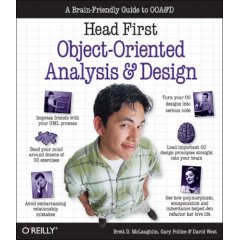
Head First Object-Oriented Analysis and Design

Head First Object-Oriented Analysis and Design by Brett D. McLaughlin, Gary Pollice and David West. Published by O’Reilly.

I found it hard to write a review about this book. Why? Because apart from a few, very minor typos it is simply superb! In my opinion, it is one of the best and sure to be one of the most influential books in this subject area. The O’Reilly Head First series of books are fast becoming the de facto standard, and I recommend that anyone who wants to get a deep understanding of how you should approach designing and developing software, read this book, no matter what your background or current skill set is. To date, I’ve read this book twice, cover to cover. It is not a particularly thin book, but it is very easy to read.
A colleague once told me that he picked up “Head First: Design Patterns” in a bookshop and flicked through it. He didn’t buy it because he wasn’t sure about the format, which if you’ve never seen a Head First book before, might at first seem a little different and perhaps off putting. As one reviewer put it:

Hidden behind the funny pictures and crazy fonts is a serious, intelligent,
extremely well-crafted presentation of OO Analysis and Design. As I read the
book, I felt like I was looking over the shoulder of an expert designer who was
explaining to me what issues were important at each step and why
.” — Edward Sciore

The book’s primary focus is “How to write great software”; this is summarised in 3 steps:
  1. Make sure your software does what the customer wants
  2. Apply basic OO principles to add flexibility
  3. Strive for a maintainable, reusable design.
It is a practical, readable and refreshing step-by-step walkthrough of the development process. It covers how to incorporate flexibility into all aspects of the software development life cycle. This book leads you through simple and then more advanced concepts by allowing you, the reader, to make the connections. In addition, it gives an easy to understand introduction to UML class diagrams.
Kathy Sierra talks about “Creating passionate users” over at the blog of the same name (highly recommended reading, as it is a gold mine of ideas and advice on creating great software). One of the beliefs espoused there is that it is better to get passionate responses from users at either end of the spectrum (i.e. love or hate it), rather than a mediocre “Yeah, it’s OK”. Judging by the polarised reviews over at Amazon, this book certainly creates passionate users/readers.
It is always hard to do justice to a great book in a short review, and this book is no exception. It is more readable and accessible than most other OO design books (excluding the other Head First design titles, of course!). I agree with Steve Bailey’s comments:

”I’d recommend this book to even the most veteran OO programmers. I put it up
there along with Code Complete …”

I would love to hear your thoughts on this book, so please leave a comment.

Careful with Those Bits, Eugene

I came across this roundup page of bit manipulations several years ago, and then prompty lost it.

So what are they good for? You’d be surprised where they crop up. Many a novel solution relies on these techniques. Admittedly, if all you are writing is UI presentation code, these probably won’t be of much use. On the other hand, if you ever take part in any ‘speed’ coding puzzles, there are deep low level techniques to be gleaned.

I’m posting a link so I can find it again!

(PS. Anyone recognise where my terrible title comes from?)

Regular Expression Resources

There are several tools that can assist with creating and testing regular expressions. The Regulator and Expresso are perhaps the most widely used.

The Regulator, written by Roy Osherove, features syntax highlighting and integrates with Regexlib.com’s database of online regular expressions via a web-service.

Expresso, written by Jim Hollenhorst, is another great tool for building and testing regular expressions. Expresso has some very nice features such as generating ready-to-paste C# code snippets from your regular expression.

Regex Workbench, written by Eric Gunnerson, has a nice feature that shows Tooltips that decode the meaning of subexpressions within an expression.

RegexDesigner written by Chris Sells is another useful tool. It is not quite as fully featured as some of the others.

Resources

Regular Expression Cheat Sheets

It might be a strange name for a technical site but www.ilovejackdaniels.com has a few gems of ‘cheat’ sheets (memory aid would be more accurate). The excellent regular expression sheet is no exception. In addition to the downloadable and printable cheat sheet this page gives one of the most understandable descriptions of regular expression functionality you will find anywhere.
There is a slightly less comprehensive but useful crib sheet here.

UPDATED: Add Regular-Expression.info to the resources list.