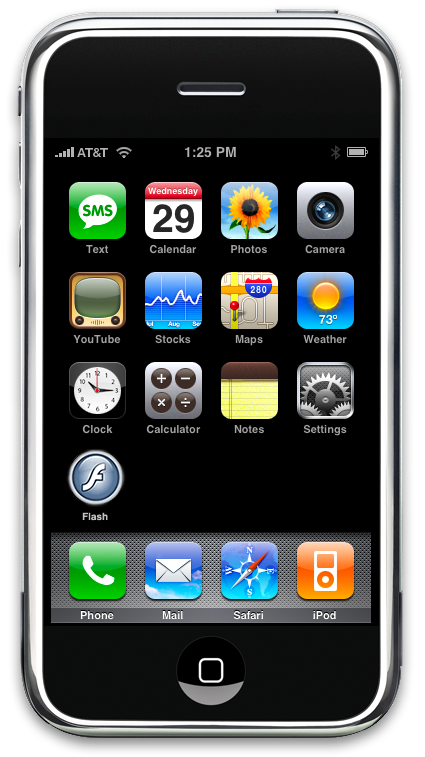
Is the iPhone as good as the hype would have you believe?

Nope. It’s actually better! I can honestly say, hand on heart, the iPhone is the coolest, sexiest bit of technology I have owned. The design is amazing, ease of use is phenomenal, it is very intuitive across many applications. In short, it’s a design classic. To quote that lynchpin of style, “It’s Groovy, Baby!”.

The Nokia classic model that I’ve had for several years (it’s another design classic, in my opinion) was starting to look a bit battered and outdated, though it still works fine. I’ve been thinking about getting a replacement since last year, and kept putting it off because none of the models I looked at were that compelling; each seemed to be missing something, that certain ‘je ne sais quoi’. A while back I was considering a HTC Dual but got put off by the display model which seemed to be falling apart after only a short time on display in the shop.
Recently, I had pretty much decided I would like an iPhone but found myself wavering. Rick Strahl’s post Justifying an iPhone, tipped the balance and I took the plunge. The iPhone is not officially released yet here in Australia (apparently, a 3G model is due to be released towards the end of 2008), but that does not mean you can’t use one right now. Despite the fact that Apple seem to favour the ‘lock in business model’ (and I definitely echo Rick’s negative feelings about this shortcoming), I predict these will sell like hot cakes when they are released here.

Rick’s follow up post, Custom iPhone Ringtone Installation, mentions how you can unlock your iPhone using Ziphone and use your existing SIM card and provider.

I know it’s a cliche, but I can’t imagine Microsoft ever designing something so sexy. I only wish they would! Really I do. Whatever happened to the “Microsoft: Change the world or go home” mantra (late 2006), or the ‘user experience’ push (early 2007)? User Experience does not mean rounded corners and ‘aeroglass’ fades! I mean come on, fess up: was Vista really such a technological leap forward?

Remember this?

Frank Arrigo has a post over at his blog, Did someone mention Win2K??, where he admits surprise that more than 50% of his readers are still running XP. There’s probably a good reason for that, Frank! [On the subject of Vista, what maniacs dreamt up that awful bloody Vista retail box? The one that required extra sticky-tape additions to give clues how to open it!]
Don’t get me wrong. Microsoft has significantly changed the software development landscape (among other things), and will continue to do so. I just feel they are not achieving their full potential.
Since I’ve taken the Apple plunge, I think I might buy a MacBook Air next (although I really would like that Intel Quad core)!! I feel sorry for those Microsofties, who secretly want to buy an iPhone! 😉

Perth .NET User Group: April Meeting

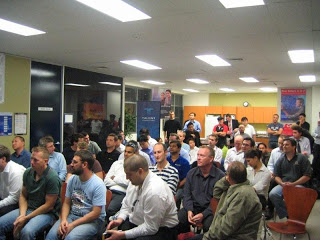
April’s .NET user group meeting, ‘Delivering on the Promise of SOA’ with Bill Poole, was another success with a great turnout (49 people).

After a quick introduction, Dave Gardner gave an overview of the library that we have put together, which now contains around 90 books. It’s free for members use, and includes some great learning resources.

As you can see, it was standing room only. [The empty chair was Stephen Liedig’s who took these photos!]

Bill did a great job of covering a huge amount of material in the one hour session; I walked away with several ideas to consider and think over; I particularly liked his section on anti-patterns. If you were not able to make this session, Bill has kindly posted his slide deck here. We will hopefully get Bill back for another session to cover more of this important topic.

Thank you to Bill for presenting this session and thanks to everyone who attended, and to everyone who helped make the evening a success.

GTA IV Trailers

Not much longer to wait for GTA IV, unless of course you’re hanging out for the PC version (as I am). There are a bunch of trailers here. Love the last one, which is done ala ‘koyanasqatsi ‘ (if you’ve never seen that film, go and get it. It’s amazing.).

Mole and PowerCommands for Visual Studio

Yesterday, 2 colleagues pointed me to two very useful tools for Visual Studio.

Mole is a data visualiser that has been tested on WPF, WCF, WF, WinForms and ASP.NET projects on VS2005 and VS2008, C# and VB.NET. Not only do you get a nice bit of software (for free!) but in addition, the creators have put together tutorial videos and a manual. You can download it here.

The other tool that was mentioned was PowerCommands for Visual Studio 2008 which seems to be an updated replacement for CoolCommands 3.0 (for Visual Studio 2005). Definitely worth a look.

Last but not least, I have not been keeping up with the latest developments in Mocking, namely Moq. This looks like an interesting library.

Thanks to John Barrett and Adrien Brown for the heads up.

Team Foundation Sidekicks 2.0

I must have missed the announcement of Team Foundation Sidekicks version 2.0 back in January. This version introduces a number of bug fixes, new Code Review Sidekick and a Visual Studio integration package. It also supports both Team Foundation Server 2005 and 2008. If you’re not already using it, it’s a great add-on for TFS:

“Team Foundation Sidekicks is a suite of tools for Microsoft Team Foundation Server Administrators and advanced users providing Graphic User Interface for administrative and advanced version control tasks in multi-user TFS environments.”


Perth .NET User Group meeting: Delivering on the Promise of SOA with Bill Poole

Join us at the Perth .NET Community of Practice, April 3rd to hear Bill Poole talk about delivering on the promise of SOA. It is a commonly held belief that transitioning to a Service Oriented Architecture (SOA) simply involves exposing a bunch of Web services. If only it were that easy! SOA is currently receiving much attention and is surrounded by considerable hype. As such, it is often misrepresented by various industry stakeholders in pursuit of their own agendas.

In this session, Bill will cut through the hype and misinformation surrounding SOA and provide a clear practical description of the design patterns and best practice that will help developers deliver on the promise of SOA.

TOPIC: Delivering on the Promise of SOA with Bill Poole
DATE: April 3rd, 5:30pm
VENUE: Excom, Level 2, 23 Barrack Street, Perth
COST: Free. All welcome.

Bill Poole is a Senior Consultant with Change Corporation, primarily consulting in Solution Architecture. With over nine years of industry experience, his professional interests include SOA, systems integration, large scale application development, as well as design patterns and best practice. More details here.

Spelunking in the .NET Compact Framework

If you are using the .Net Compact Framework 3.5 and need to delve into memory allocations or performance related issues, then the Power Toys for .NET Compact Framework 3.5, released mid-December last year, are what you need. The word ‘toy’ in the title is perhaps a little misleading, as it contains some powerful tools:

  • NETCF CLR Profiler – provides detailed views of the managed heap for diagnosing various memory management issues.
  • NETCF Service Model Metadata Tool – allows you to generate a WCF client proxy to help consume WCF services on device.
  • App Configuration Tool – on device tool for specifying what version of NETCF an application will run against, displaying installed versions of NETCF and displaying information about GAC DLLs.
  • Remote Logging Configuration Tool – enables users to configure logging options on a NETCF device including: loader, interop, network, error and finalizer logs.
  • Remote Performance Monitor and GC Heap Viewer – provides real time counter data (ranging from Garbage Collector activity to type loading info) on a running NETCF application. The GC Heap Viewer feature allows you to capture a snapshot of the managed heap while your application is running to view live references, and allows you to compare multiple snapshots to find memory leaks.
  • NETCF Network Log Viewer – utility for viewing NETCF network log data.

If, like me, you are using the .NET Compact Framework 2.0, you still have access to the Remote Performance Monitor (SP1) and the GC Heap Viewer (SP2). Steven Pratschner’s blog entry “Analyzing Device Application Performance with the .Net Compact Framework Remote Performance Monitor” is a quick introduction to getting started with the RPM.

David Kline has a post describing the counters viewable through the RPM
here.

Quick Tip: if you click on “View GC Heap” in the RPM, don’t keep clicking it when nothing appears! It takes a while to gather the required info… 🙂
Why would anyone sane think a click hadn’t registered? Well, I swap my mouse from left to right hand, and quite often remote desktop into machines without the mouse buttons reversed, so my finger sometimes ‘forget’ which button is a left-click!